Pocket Porter 21.2 · Updated 2026-11-13
Your PC library, on your handheld.
Games, books, comics, videos and music, set up for your Linux handheld and copied to your SD card. No terminal. No config files.
16Pockets packeddownloads so far, and counting
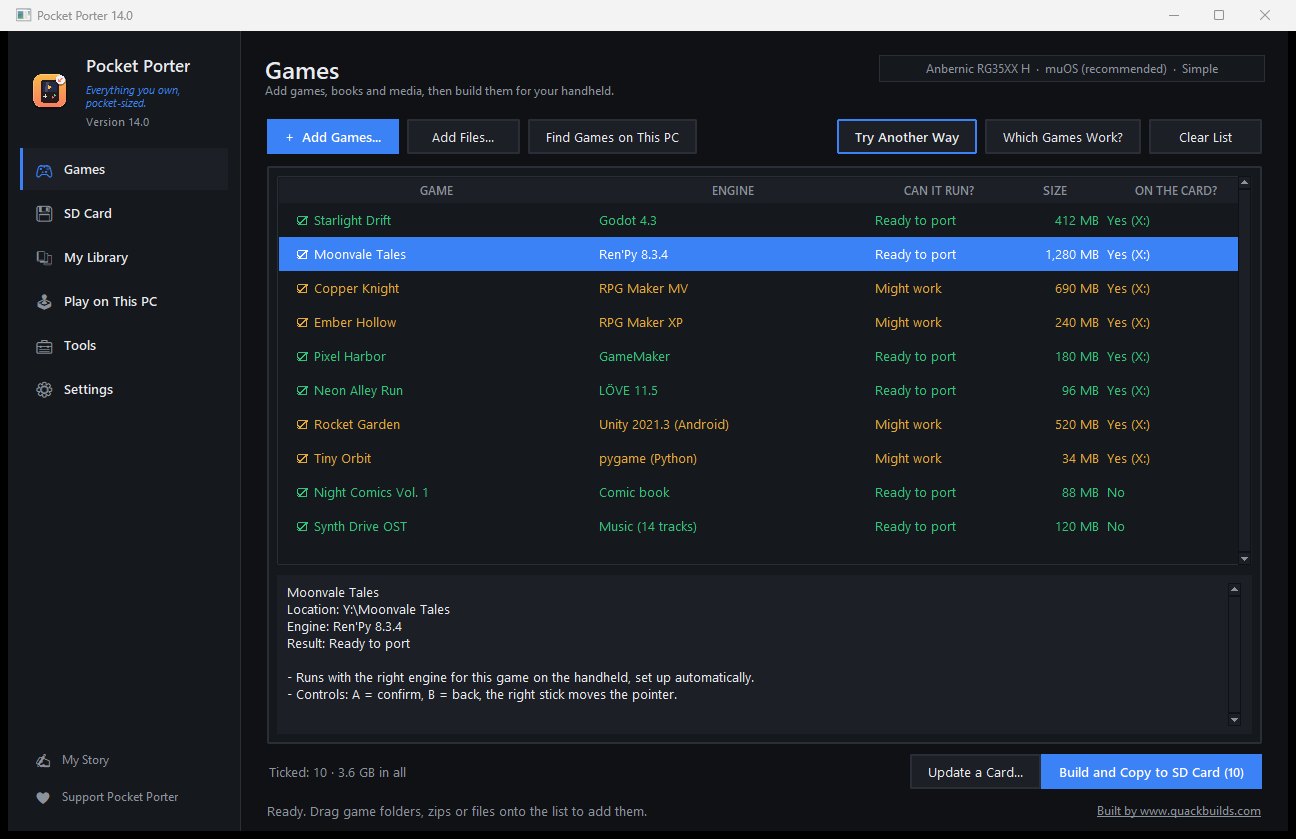
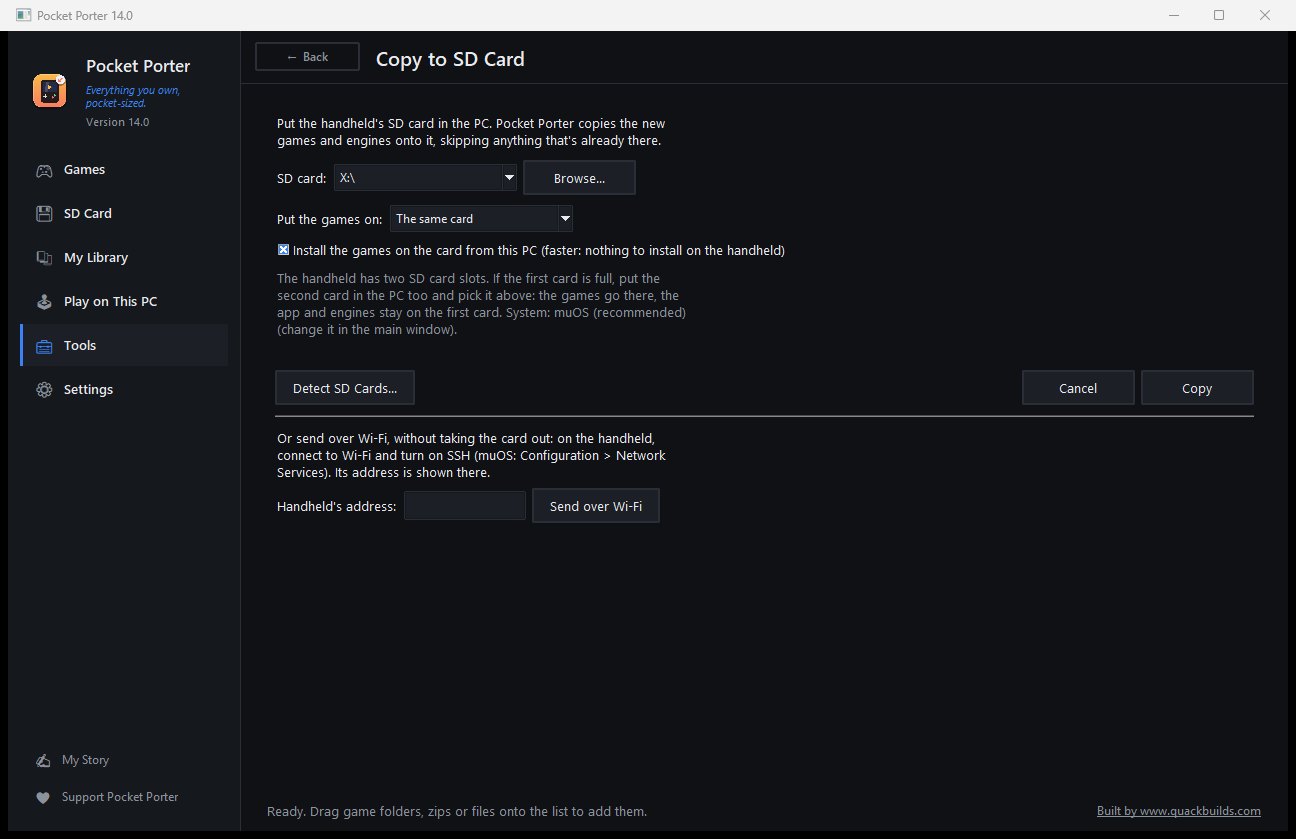
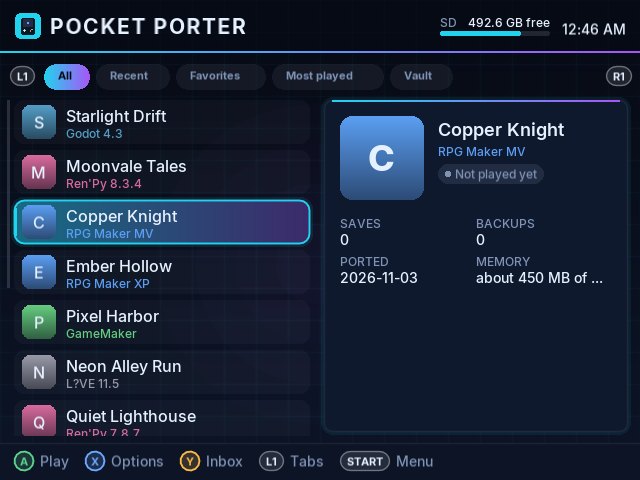
Add a game on the PC, build it, copy it to the SD card, and play it on the handheld. (The games shown are made up for this page; the demo game in the video was made for it.)
What it does
All features →Drop it in
Drag a game or a folder in. Pocket Porter finds the engine, picks the best way to start it and builds it for your handheld.
Buttons that just work
A control layout for every engine, a mouse pointer on the stick, and ready-made layouts to try if a game wants different keys.
Made for 1 GB handhelds
Built and tuned on a low-end device from day one: smaller pictures, lighter sounds, lower draw size, only when it helps.
Library, books and comics
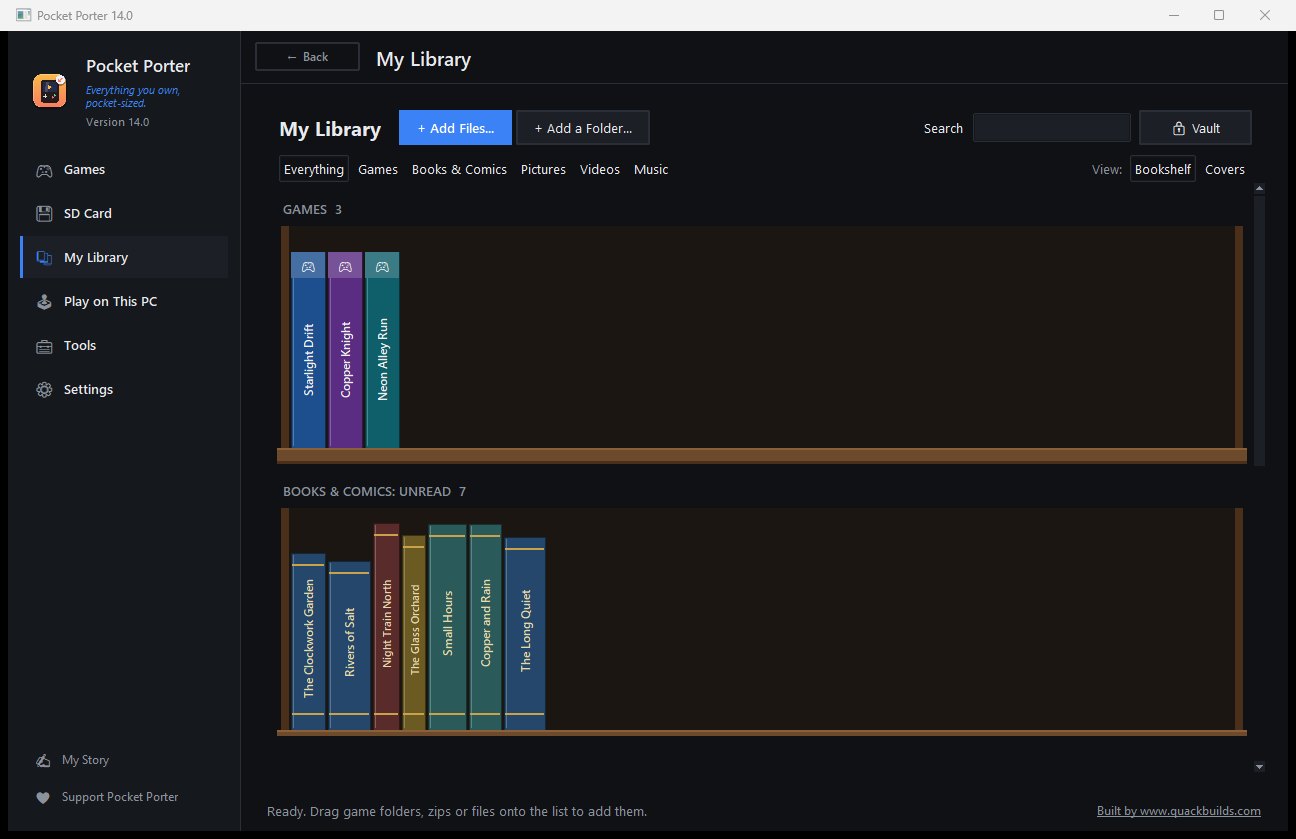
Shelves for games, books, comics, videos and music, with a private vault, reading progress and two-page view.
Saves and translation
Edit money and items in saves, merge saves, and translate games into your language.
Play on your PC too
Try a game on the PC first with your controller, or use the handheld as the controller. PC handhelds get their own tools.
Screenshots
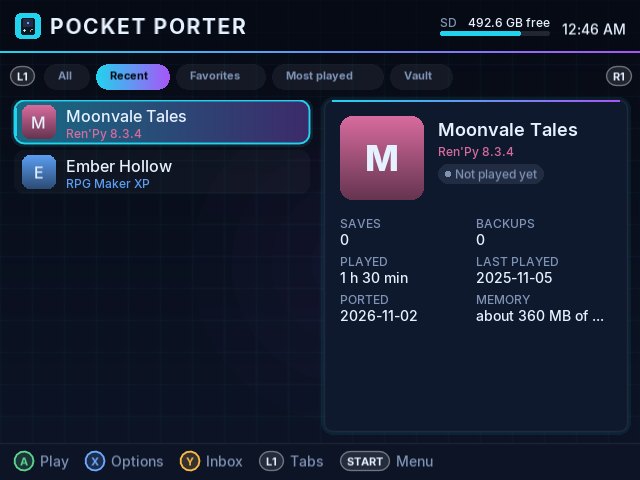
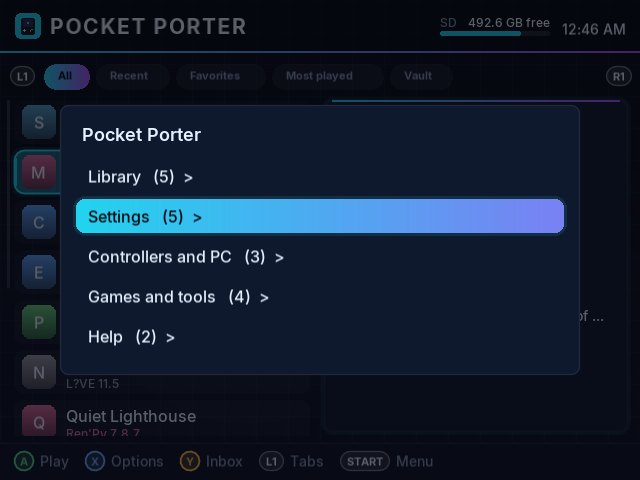
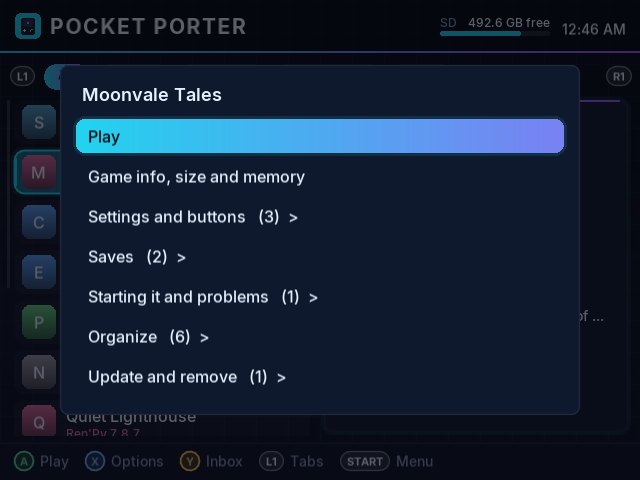
Everything it does
Pick a group. Each one lists exactly what is in it.
Games: drop them in, play them on the handheld
- Drag in a game folder, zip or installer: Pocket Porter works out the engine and the best way to run it
- Engines: Ren'Py, RPG Maker 2000/2003, XP, VX, VX Ace, MV and MZ, GameMaker, Godot 3 and 4, LÖVE, FNA / XNA / MonoGame, Java (libGDX), Python / pygame, Pyxel, PICO-8, TIC-80, Solarus, OpenBOR
- Visual novel engines: KiriKiri, ONScripter, RealLive (rlvm), System 4
- Web games: HTML5 (Construct, GDevelop, Phaser, Twine, TyranoBuilder), Flash, Shockwave and Scratch
- Adventure games: Adventure Game Studio, ScummVM games, Wintermute and SLUDGE
- Classic PC games with free engines and your own files: Doom, Quake, Duke Nukem 3D, Blood, Half-Life, Diablo (DevilutionX), Theme Hospital (CorsixTH), RollerCoaster Tycoon 2 (OpenRCT2), Morrowind (OpenMW) and more
- Console games for RetroArch (Game Boy up to PlayStation, N64, DS, PSP, Dreamcast, Saturn, Jaguar...)
- Android APKs of Unity, Godot, GameMaker, LÖVE and Ren'Py games, and Linux ARM64 programs (newer Unity games get the pointer as a mouse, with an arrow you can see)
- Android Unity games (experimental): a new loader where the buttons and pointer work all game long, sound (follows the game's Sound setting), Unity 6.3 and 2022.3.62 get further, and the loader used before stays as a fallback way
- Android Unity games made lighter for 1 GB handhelds: textures at half size and long sounds kept compressed (any file size, pieced data too), when built and by Check Games
- Android Unity games made with Unity 2023, 6.0 and 6.3 start on the new loader (experimental), and games that use their own extra libraries (like Live2D characters) load them
- Android Unity games fit any handheld's screen in their own shape (centred, black bars), for the handheld picked in the app; Screen size and Stretch work for them
- Lighter movies for Ren'Py games: Check Games makes big movies the screen's size so they play smoothly, shown at the same size in the game
- Android Unity games that showed a black screen with a pointer: Unity's frame pacing (which crashed their drawing on the handheld) is turned off
- No more frozen handheld: a game that runs it out of memory is stopped first and the log says why; compressed memory (zram) is kept ahead of the SD card's swap
- Ren'Py 7 and 8 up to the newest Ren'Py 8.6
- Windows games through Wine and Box64 (extremely experimental and a work in progress: on a 1 GB handheld, Unity 2022.3 games with Direct3D 11 now start and play on the graphics chip through virgl, slowly; many other games do not start yet)
- "Can it run?" for every game before you build it, with the reason when it can't
- Several ways to start each game: picked automatically, or choose one yourself
- Test every way: tries each way a game can start and tells you which ones work
- Windows installers (Inno Setup, Nullsoft) opened without running them
- LAN play for DOS games between two handhelds on the same Wi-Fi
- Hotspot: the handheld makes its own Wi-Fi network, so handhelds can play together with no router at all
- Online play over the local network (an on / off choice per game): Pokemon Essentials Cable Club battles and trades between handhelds on the same Wi-Fi or hotspot, no internet needed
- Ren'Py games try every Ren'Py version on the card, the closest to the game's own first, until one works
- GameMaker games get the engine versions closest to the GameMaker that made them (up to 2024)
Supported devices
Pocket Porter was built and tested on an Anbernic RG35XX H. Every other handheld below is set up from its parts and should work, but hasn't been tested yet: if yours behaves differently, Report a Problem in the app.
The developer's handheld
TestedSystems: muOS (also Knulli, ROCKNIX, Batocera)
- Anbernic RG35XX H
Up to PlayStation 1, N64, DS, PSP, Dreamcast, Saturn and Atari Jaguar.
1 GB, Allwinner H700 / A133P
Should work · not testedSystems: muOS, Knulli, ROCKNIX, Batocera
- Anbernic RG35XX Plus, RG35XX (2024), RG35XX SP
- Anbernic RG28XX, RG34XX, RG34XX SP, RG34XXH
- Anbernic RG40XX H, RG40XX V, RG CubeXX
1-2 GB, Rockchip RK3566
Should work · not testedSystems: ROCKNIX, Knulli, ArkOS, Batocera
- Anbernic RG353 V / VS / P / M / PS, RG503, RG ARC-D / ARC-S
- Powkiddy RGB30, X55, RGB20 Pro
- Miyoo Flip
1 GB, Rockchip RK3326 and similar
Should work · not testedSystems: ArkOS, ROCKNIX
- R36S / R35S and clones, R36 Max, Kinhank K36, Batlexp G350
- Powkiddy RGB10 Max 3, RGB20SX, RGB10X
- MagicX XU Mini M, XU10
Strong (6 GB or more)
Should work · not testedSystems: ROCKNIX (Linux on an SD card)
- Anbernic RG556, RG406H / RG406V, RG557, RG477M
- Retroid Pocket 4 Pro, 5, Mini, Flip 2, Classic, 6
- AYN Odin 2 / Odin 2 Mini / Portal, AYN Thor
PC handhelds
PC toolsSystems: Windows or SteamOS
- Valve Steam Deck
- MSI Claw / Claw 7 / Claw 8
- ASUS ROG Ally / Ally X
Not supported
Not supported- Miyoo Mini Plus (OnionOS has no PortMaster)
- Anbernic RG Nano (too small)
- Powkiddy V90 (no Linux games)
Changelog
Pocket Porter is updated often: we try to roll out updates daily when possible. The app updates itself, and the handheld app gets the same version number.
21.2Unity 6 / 2023 Android games start on the new loader, games fit any handheld's screen, Live2D characters show, lighter Ren'Py movies, turned games turn their buttons2026-11-13
On the handheld
- Android Unity games made with Unity 2023, 6.0 and 6.3 start on the new loader (they crashed before the first picture: the loader gave Unity no "main thread looper"). Their frame pacing (which crashed Unity 6 games) is switched off too, now that their settings can be read.
- Android Unity games fit the screen: each game keeps its own shape (a 16:9 game on a 4:3 screen had its sides cut off, an upright phone game looked zoomed in), centred with black bars. The screen size is the handheld picked in the PC app. The game's Screen size and Stretch settings work for Android Unity games.
- Android Unity games that use their own extra libraries (like Live2D for moving characters) load them: the characters showed as empty pictures before.
- Quitting an Android Unity game no longer counts as a crash (it wrote a crash file on the way out).
- A turned picture (game menu > Screen) turns the D-pad and sticks with it, in every kind of game.
- The auto sleep no longer puts the handheld to sleep a second time while muOS's own sleep is on (on the H700 handhelds muOS's sleep keeps the app running, so its timer went on).
- Ren'Py movies made lighter by the PC (below) show at the same size as before.
- The pointer's "no frames" line is only written when no picture came for a whole minute.
On the PC
- Lighter movies for Ren'Py games: Check Games offers to make movies bigger than the handheld's screen the screen's size (a game with 500 big movies played them at a frame a second and looked frozen). The old files are kept on the card (PocketPorter/previous/videos).
- The Unity memory step reads newer Unity versions (Unity 6 and 2023 gave "Expected to read ... bytes" or "read_str out of bounds" and were left as they were). When a version can't be read it says so, instead of "already as light as this step makes it". Games done before are offered the step once more.
- Check Games on a second card: "Switch to the newer launcher" works (the start scripts are on the muOS card, so it said "Only Ren'Py and web games have a newer launcher").
- Check Games notes Android Unity games whose textures are in formats the handheld's graphics chip can't read (Unity unpacks them to full size in memory), and suggests muOS zram at 1024 MB when a Unity game ran low on memory with less.
- Ren'Py games that ship only compiled files show their Ren'Py version (they showed "version unknown").
21.1Android Unity games playable (controls, sound, less memory), RPG Maker MZ several times faster, big Flash and Adobe AIR games start, two-key button combos, no more frozen handheld2026-11-13
On the handheld
- RPG Maker MZ (and MV games drawn with WebGL) draw much faster on the processor: a colour or tone filter that changes nothing is skipped (every MZ screen drew the whole picture twice for it), and filters now follow Draw size. An MZ title screen went from 1.4 to 10.5 frames a second, 17 at Draw size 25%.
- Web games no longer pick up the in-game menu settings (frame limit, Draw size) of the game played before.
- Big Flash and Adobe AIR games: Flash's own player (Ruffle) works on the graphics chip again, and is tried first for big Flash files (the browser player held them in memory several times). Adobe AIR games run as AIR games now.
- Buttons: a button can press two keys together (for example Shift + Enter). In a game's Change buttons, pick "Two keys together (combo)", then the two keys. Works in every kind of game.
- The pointer's status lines no longer fill game logs every 10 seconds.
- Android Unity games: a new loader. The buttons and pointer now work all game long (the old one stopped reading them the first time the pointer moved without a button held, so games sat on their first screen). A game that never got past its warning screen now plays.
- Android Unity games have sound now (Pocket Porter's own Android sound part, played through the handheld's normal sound, a little louder). It follows the game's Sound setting: Sound off = not loaded at all.
- Newer Unity versions get further: Unity 6.3 games start Unity's engine, Unity 2022.3.62 games no longer crash at the start. Games the new loader can't start yet (Unity 2023 and 6.0) move on by themselves to the loader used before.
- The pointer moves again in Android Unity games on handhelds with more than one controller device, and A touches even after a stray mouse event at the start.
- No more frozen handheld: a game that runs it out of memory is stopped first and the log says why. Compressed memory (zram) is used before the SD card's swap file again; tip: zram at 1024 MB in muOS settings.
On the PC
- Flash files too big for the handheld's memory are made lighter when the game is built: the pictures are saved again at a lower quality (same size, they look nearly the same) and the file is stored unpacked, so it is loaded once. Games already on the card: Check Games on SD Card offers "Make the Flash file lighter".
- The SD Card tab has all the card tools, in groups like Tools: Copy & Update, Check & Fix, Room & Cards and Saves.
- Android Unity games are made lighter for 1 GB handhelds when built: textures drawn at half size and long sounds kept compressed, in game files of any size and in games whose data is cut into many pieces. Games already on the card: Check Games on SD Card (Fix Everything) does it once.
- Android Unity games that showed a black screen with a pointer: Unity's "Optimized Frame Pacing" is turned off in the game's settings (it crashed the game's drawing). Three games that only showed black now show their picture.
21.0Games on a second card from a one-slot PC, every Ren'Py version tried, FPS and stats box, Check Games fixes everything by itself, GameMaker 2024 games start2026-11-12
On the handheld
- Show FPS and stats: a small box at the top left with the game's frames a second, CPU use, temperature, CPU speed, battery and free memory. Turn it on in the in-game menu: Speed and battery > Show FPS and stats (kept for each game). Works in games drawn with OpenGL, in Ren'Py and other games inside Weston, and in web games.
- Ren'Py games try every Ren'Py version on the card, best match first, until one works. Some games were given one wrong version (an Android Ren'Py 8 game got only Ren'Py 7) and could never start. Games already on the card are fixed the next time they start.
- Android Ren'Py games: the game's own Ren'Py version is read now, so the right version goes first.
- GameMaker games are given the engine versions closest to the GameMaker that made them, from the ones on the card. A GameMaker 2024 game was given versions from 2.2 to 2022 only and crashed every time. Games already on the card are fixed the next time they start.
- GameMaker shaders that use smooth-edge functions without asking for them (some fonts) are fixed on the way to the graphics chip, which refused them.
- "None of the versions could start this game" only shows after the last version was tried. It showed after the first one, while the app was still trying the others (all kinds of games).
- A game that loads for a long time without a picture is no longer stopped as a black screen while it is still working (using the processor). The checks for a growing log and for pictures never worked on muOS (it has no "stat" command); they do now. Games' own error watch works now for the same reason.
- A way of starting a game is only remembered as the one that works if the game showed pictures. Giving up on a black screen made that way the first one tried at every start.
- The handheld doesn't go to sleep while a game is still loading (no picture yet, first 20 minutes).
- Games put on the second card from the PC by themselves show in the game list (the app moves their start scripts to the first card the next time it opens).
- Web games made of links: on a long page with no link on the screen, nothing is picked (a side menu's hidden button was picked before, and A opened the menu). Down and A scroll the page, Up scrolls back, and the first link that comes into view is picked.
- Web pages that grow with the window fit the screen again (a game's menu was cut off at the bottom since 20.0): they're zoomed out in one step instead of the old steps.
On the PC
- Copy to SD Card: a second card can be put in by itself (one card slot on the PC). Only the games go on it, installed and ready to play (or into its inbox); the folders it needs are made. The app and engines on the muOS card in the handheld are used.
- The wrong message "Pocket Porter only installs to muOS" is gone. A second card with a ROMS folder was taken for Anbernic's own system.
- Check Games on SD Card puts every fix Pocket Porter knows on the card by itself first (a newer app, the engines' changed files, every game's start script), then lists what's left.
- Update a Card, Copy to SD Card and Check Games now compare the engines' files themselves: the web player's fixes from 19.7 and 20.0 never reached cards that already had a web player. Update your card once to get them.
- Check Games offers "Try every Ren'Py version" for a Ren'Py game that lists only some.
20.0Web game buttons work, packed Ren'Py games start again, screen rotation works, pointer on either stick, faster RPG Maker XP starts, tidier game menu2026-11-12
On the handheld
- Web games (HTML5): the D-pad and A now work. The browser window never got the key presses from the buttons (only the pointer worked). The web player now reads the controller itself and presses the keys the game's button file gives each button. Games that read the controller themselves keep doing so.
- Web games made of links and buttons: the D-pad picks the buttons a game made out of plain boxes and pictures too, A presses the picked one (it could press whatever was under the pointer instead), and the first pick is the choice nearest the middle of the screen.
- Web pages that grow with the window no longer shrink step by step down to tiny text: they keep the text size and are scaled to fit instead. One kind of web game stopped loading because of those steps.
- Web games made for NW.js with Node turned on get Node in the page, like in NW.js.
- Web games: the page's own errors go into the game's log (a game that doesn't load says why).
- Ren'Py games whose files were packed (Pack Game Files) start again: Ren'Py couldn't see the packed pictures and stopped with "Couldn't find file". Games already on the card are fixed the next time they start.
- Ren'Py "Smaller pictures": the smaller copies showed at a quarter of their size (backgrounds looked missing). They show at full size now.
- Packed games find their files much faster (the pack has a folder index now). An RPG Maker XP game's file list took about 45 seconds at every start, now about 10. Packs made before 20.0 get the index by themselves the first time the game starts (a few seconds, once; the pictures and sounds aren't touched).
- Screen rotation works now: the system's own picture turning was switched off. Games already set to a turned screen turn the next time they start.
- The pointer can be on the left stick: the first setup asks, Start > In-game settings changes it, and a game's own settings can pick the other stick for that game. Pressing the pointer's stick clicks (L3 on the left, R3 on the right); the other stick takes over what the pointer stick did.
- The in-game menu is shorter: the most used rows at the top, the rest in groups (Screen and picture, Speed and battery, Pointer and auto-click, More). A opens a group, B goes back.
On the PC
- Pack Game Files: "Upgrade Old Packs (faster)" gives every pack on the card made before 20.0 its folder index at once (only the pack's small table part is rewritten and checked; put back if anything differs).
- New packs are made with the folder index.
- After an update, the app reminds you to update the SD card too (Update a Card), so the handheld gets the new version as well.
Download
Pocket Porter 21.2 for Windows
Windows 10 and 11. The app updates itself from inside when a new version is out (we try to roll out updates daily when possible), and updates your SD cards the next time you plug them in.
- Unzip it anywhere (it needs about 4 GB).
- Start Pocket Porter.exe. Windows may ask to confirm the first time, because the app is new and not yet widely known.
- Drop in a game, plug in your SD card, and copy it.
16Pockets packeddownloads so far, and counting
Experimental. All of Pocket Porter's features are a work in progress. Many games work well, others need fixes or won't run yet. Back up your SD card and saves, and use Report a Problem in the app when something goes wrong: every report helps.
You bring your own legally owned files.